AI Tools
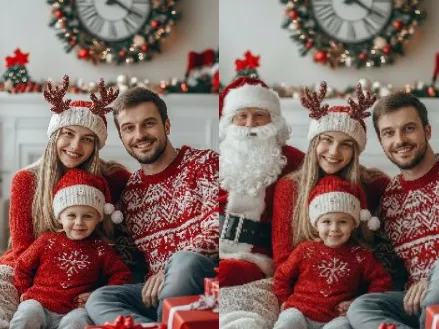
AI Add Santa to Photos Generator
Add Santa to Photos AI Tools lets you place Santa into any photo instantly.
Custom Santa overlays, high-quality output, and seamless background blending for holiday-ready images.

Real-World Applications
From influencers to stores, bring festive storytelling to every audience.
E-commerce Brands
Create holiday product scenes without hiring models or sets, so you launch campaigns faster.
Social Media Creators
Surprise followers with playful Santa cameos that boost engagement and save production time.
Family Photographers
Offer seasonal packages by enhancing client photos with believable Santa overlays and refined finishes.
Why Creators Choose This Holiday Toolkit
Make seasonal content faster, more emotional, and easier to scale.
Add Santa to Photos AI Tools for Instant Magic
Drop a photorealistic Santa into any scene without complex editing. You save time while keeping images believable.
Smart Background Blending
Edges, lighting, and color adapt to your photo automatically. Your results look like they were shot together.
High-Resolution Output
Export print-ready images or social posts with crisp detail. Your visuals stay sharp across formats.
Customizable Santa Styles
Choose classic, modern, or whimsical Santa looks to match your campaign tone. Your brand voice remains consistent.
Automated Shadow and Lighting Matching
Shadows and highlights align to the original photo for realistic placement. You avoid the uncanny valley and build trust.
Quick Batch Processing
Apply the same Santa style to dozens of photos in one run. You scale seasonal content without extra shoots.
How can you add a believable Santa to your photos?
Your 3-step path to shareable, holiday-ready images.
- Step 1
Upload Your Photo
You pick the image you want to transform and upload it from your device or cloud library.
- Step 2
Choose a Santa Style
You select a preset or tweak details like pose, size, and lighting to match your scene.
- Step 3
Download or Batch Export
You preview the composite, make minor edits, then export single shots or process multiple files at once.
Frequently Asked Questions
Is my edited image safe to use commercially?
Can I remove the background before adding Santa?
What export formats are supported for prints?
Can I apply the same Santa look to many photos at once?
How do I keep edits consistent across a campaign?
Complete Your Holiday Editing Toolkit