AI Tools
AI Person Remover AI Tools Generator
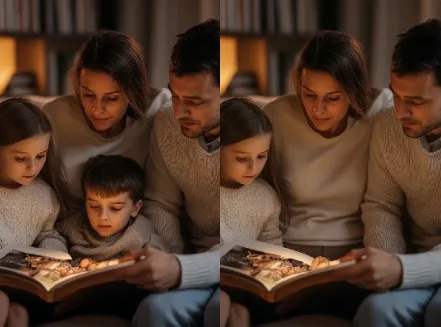
Effortlessly remove people from photos using AI Person Remover AI Tools to save time.
A privacy-first person-removal suite with batch editing, high-quality fills, and customizable outputs for every workflow.

Real-World Applications
From solo creators to teams, save shoot time and protect privacy across projects.
E-commerce Brands
Swap crowded lifestyle shots for clean product frames to improve conversions and listing clarity.
Photographers
Remove bystanders or unwanted people quickly so you can focus on composition and storytelling.
Marketing Teams
Prepare campaign visuals that meet legal and brand guidelines without returning to the studio.
Why Creators Choose This Tool
Make complex edits feel simple and keep visuals on-brand without heavy software.
Lightning-Fast Results
You get ready-to-use images in moments, cutting manual retouch time dramatically.
Batch Cleanup at Scale
Process dozens or hundreds of shots in one pass so your team delivers faster.
Natural-Looking Fills
Fill areas blend with surroundings to keep focus on the subject you want.
Privacy-Safe Exports
You control metadata and export settings to protect personal data and brand standards.
AI Person Remover AI Tools Precision
Edge-aware selection preserves fine details, so your edits look handcrafted not automated.
Custom Presets & Workflows
Create and reuse styles so your visual output stays consistent across campaigns.
How Can You Remove a Person from an Image Quickly?
Your 3-step path to clean, shareable photos
- Step 1
Upload Your Image
You drop your photo into the editor and pick the removal preset that fits your scene.
- Step 2
Refine the Mask
You nudge edges and choose a blending style so the filled area matches lighting and texture.
- Step 3
Export and Share
You save in preferred formats with privacy-safe metadata and apply batch presets if needed.
Frequently Asked Questions
Is it hard to learn?
Can I batch process hundreds of images?
Will edits look natural on close-ups?
Are exports safe for public use and commerce?
What about copyright when I alter images?
Complete Your Visual Toolkit