เครื่องมือ AI
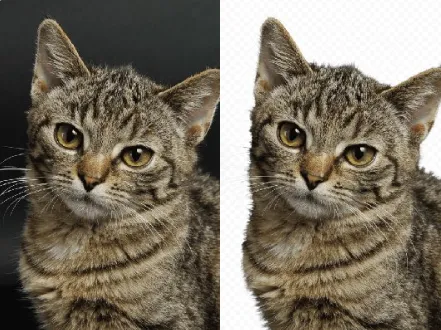
AI Background Cutout Tool Generator
AI Background Cutout Tool AI Tools instantly isolate subjects with studio-grade precision.
A tool suite for custom, high-quality background removal, batch exports, and consistent product visuals.

Real-World Applications
From solo creators to growing brands, improve visual output without studio overhead
E-commerce Brands
Generate dozens of product variations with clean backgrounds to speed listings and A/B tests.
Photographers and Studios
Deliver retouched, ready-to-use shots faster, freeing you to focus on creative direction.
Social Media Managers
Produce on-brand carousel images and ads without costly reshoots or long edits.
Why Teams Rely on This Background Solution
Fast, reliable results that scale from single shots to full catalogs
Precision Cutouts with Edge-Aware Masks
Your subjects keep fine details like hair and fabric folds, so outputs look natural on any backdrop.
AI Background Cutout Tool AI Tools for Batch Processing
Process hundreds of images in one go and reduce turnaround time from days to minutes.
Natural Shadows and Reflection Controls
You add depth with adjustable shadows so images never feel pasted onto backgrounds.
Seamless Export Presets for Marketplaces
Your files are delivered in the exact sizes and formats required by top platforms, no rework needed.
Smart Background Replacement Library
Swap backgrounds with brand-consistent scenes to test different moods instantly.
AI Background Cutout Tool AI Tools for Custom Workflows
Connect to your asset manager or e-commerce feed so tasks run automatically after upload.
How Can You Create Flawless Background-Free Images Fast?
Your 3-step path to studio-quality visuals
- Step 1
Upload Your Images
You drag and drop single files or entire folders and choose whether you want batch or single edits.
- Step 2
Pick a Style and Preset
You select edge strength, shadow style, and export preset to match your brand or marketplace requirements.
- Step 3
Export and Integrate
You download optimized assets or push them to your CMS, keeping filenames and metadata intact for easy publishing.
คำถามที่พบบ่อย
Complete Your Brand Toolkit